Jetson Orin rootfs-ab slot switches to B unexpectedly, nvbootctrl debug
The rootfs-ab partition layout on Jetson Orin is the same mechanism OTA update systems use to switch between software versions, but it can also trigger unexpectedly when a device reboots without confirming successful boot. Understanding the retry counter is the key to preventing unintended slot switches in production.
Key Insights
- The retry counter, not a filesystem check, controls slot switches: each unconfirmed reboot decrements a per-slot counter; when it hits 0, the bootloader marks the slot unbootable and tries the other
nvbootctrl mark-boot-successfulmust be called explicitly: the bootloader does not auto-confirm a successful boot; your software must call this- Watchdog resets and kernel panics look identical to the bootloader: the slot counter decrements regardless of why the device rebooted
nvbootctrl dump-slot-infois your primary diagnostic: shows retry counts, priority, and bootable status for both slots- Asymmetric retry counts signal the root cause: if slot A has retry_count=0 and slot B has retry_count=7, the device rebooted 7 times without calling
mark-boot-successful
How Tegra rootfs-ab works
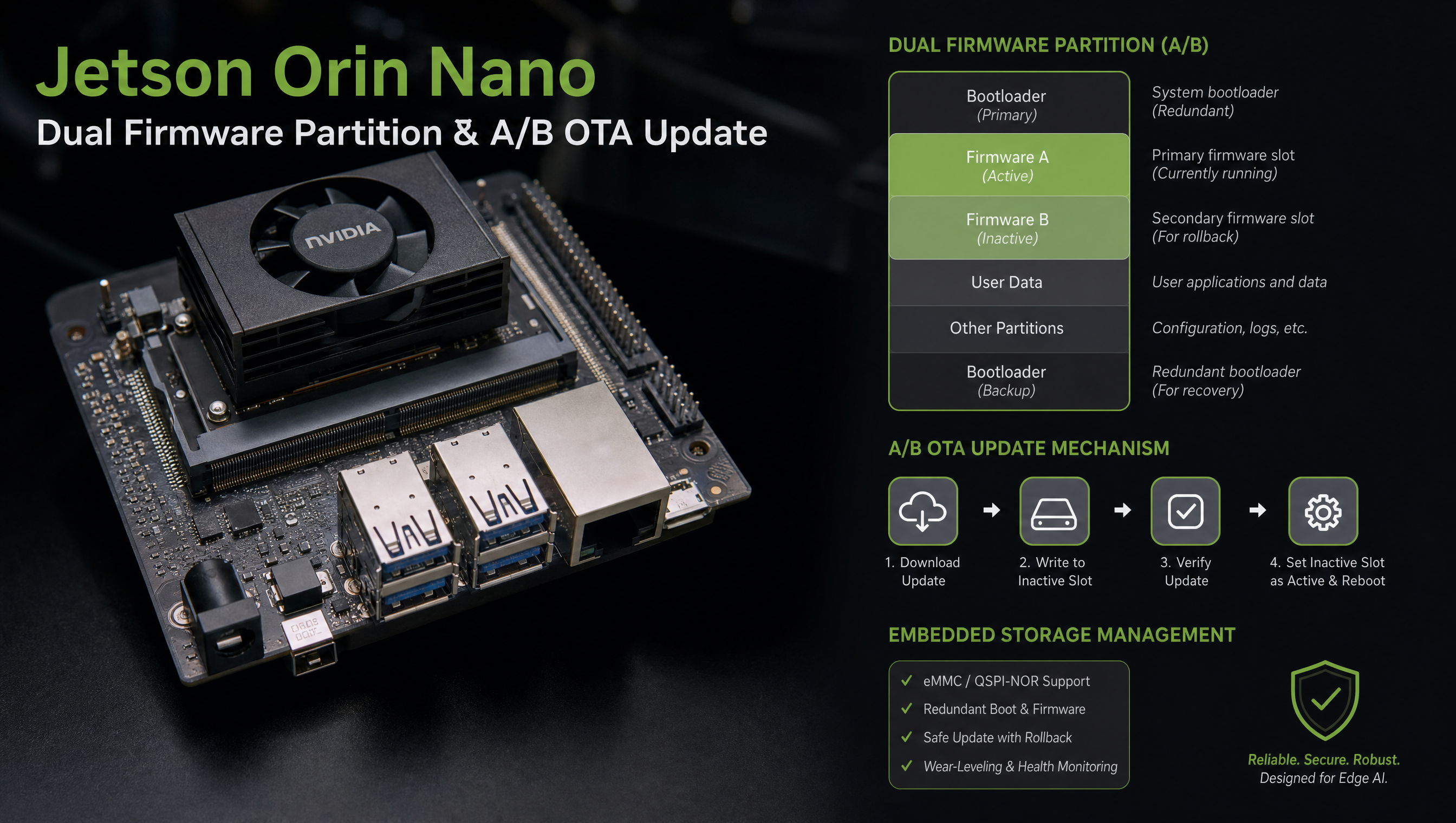
Jetson Orin uses a redundant partition layout when USE_REDUNDANT_FLASH_LAYOUT = "1" is set in the Yocto build. Each partition has two copies, A and B variants, including the rootfs.
The bootloader maintains a Boot Control Table (BCT) with per-slot metadata:
| Field | Description |
|---|---|
priority | Higher priority slot boots first (default: A=15, B=14) |
retry_count | Decrements on each unconfirmed reboot; 0 = unbootable |
successful | Set to 1 when mark-boot-successful is called |
Boot sequence decision logic:
- Select the slot with highest priority where
retry_count > 0 - Boot that slot and decrement its
retry_countby 1 - If the OS calls
mark-boot-successful→ resetretry_countto 7, setsuccessful = 1 - If the OS does NOT call
mark-boot-successful(reboot/crash) →retry_countstays decremented - When
retry_countreaches 0 → mark slot unbootable, switch to the other slot
Diagnosing an unexpected switch
# Check current slot and retry counts
nvbootctrl dump-slot-info

# Example output:
# Current boot slot: 1
# Slot 0: priority=15, retry_count=0, successful=1, bootable=false
# Slot 1: priority=14, retry_count=5, successful=0, bootable=true

# One-line current slot check
nvbootctrl get-current-slot
# Output: 1

# Check if current slot was marked successful
nvbootctrl is-slot-marked-successful $(nvbootctrl get-current-slot)
# Output: 0 (not yet marked successful)
When retry_count=0 and successful=1 on slot A, slot A was successfully marked at least once but then had its retry counter re-decremented, meaning the device rebooted after a mark-boot-successful call but the OS didn’t call it again after that reboot.
Fixing the retry counter
# Reset slot A to healthy state (run from the device)
nvbootctrl set-active-boot-slot 0      # make A the active slot
nvbootctrl mark-boot-successful        # mark current boot as successful

# Verify
nvbootctrl dump-slot-info
# Slot 0: priority=15, retry_count=7, successful=1, bootable=true
If retry_count cannot be restored via mark-boot-successful (slot 0 is marked unbootable), you need to flash slot A via SDK Manager or flash.sh.
Calling mark-boot-successful reliably
The correct place is a systemd service that runs after your application confirms it is healthy:
# /etc/systemd/system/boot-confirm.service
[Unit]
Description=Mark boot slot as successful
After=multi-user.target
Requires=multi-user.target

[Service]
Type=oneshot
RemainAfterExit=yes
ExecStart=/usr/bin/nvbootctrl mark-boot-successful

[Install]
WantedBy=multi-user.target
Enable it:
systemctl enable boot-confirm.service
For applications that take time to start, add a health check before confirming:
#!/bin/bash
# /usr/local/bin/confirm-boot.sh
# Wait for application to become healthy, then confirm boot

until curl -sf http://localhost:8080/health; do
    sleep 2
done

nvbootctrl mark-boot-successful
logger "Boot slot $(nvbootctrl get-current-slot) confirmed successful"
Common causes of unexpected switches
| Root cause | Symptom | Fix |
|---|---|---|
mark-boot-successful never called | retry_count decrements on every reboot | Add boot-confirm.service |
| Watchdog reset during startup | retry_count decrements before app is ready | Call mark-boot-successful after health check |
| Kernel panic | Device reboots without confirming | Fix kernel panic; check dmesg after switch |
| Power loss during boot | retry_count decrements, may corrupt in-progress OTA | Ensure stable power; add voltage monitoring |
| OTA update stale state | OTA set slot B active but never confirmed | OTA client must call mark-boot-successful after successful update |
Recovering a fully unbootable device
If both slots reach retry_count=0, the device will not boot. Recovery requires flashing via recovery mode:
# Put device in recovery mode (hold FORCE_RECOVERY button, power cycle)
# On host:
sudo ./flash.sh jetson-agx-orin-devkit mmcblk0p1
For A/B-aware flashing that only updates slot A without touching slot B:
sudo ./flash.sh --no-flash jetson-agx-orin-devkit mmcblk0p1
# Then flash specific partitions via tegraflash
For the OTA update workflow that uses this mechanism, see Jetson A/B OTA updates on custom carrier boards. For flashing procedures and partition layout options, see flash.sh on Jetson Orin, complete guide.
FAQ
Why does my Jetson Orin keep booting from the B partition instead of A?
The slot A retry counter reached 0 after repeated reboots without nvbootctrl mark-boot-successful. Every reboot, including watchdog resets and kernel panics, decrements the counter. Once it hits 0, the bootloader marks slot A unbootable and switches to slot B.
How do I check which slot Jetson Orin is currently booting from?
Run nvbootctrl dump-slot-info to see retry counts and bootable status for both slots, or nvbootctrl get-current-slot for a one-line answer.
How do I prevent the Jetson from switching slots after a planned reboot?
Call nvbootctrl mark-boot-successful once your application has confirmed it is healthy. A systemd oneshot service that runs after multi-user.target is the standard approach.
Can I manually force Jetson to boot from a specific slot?
Yes. Run nvbootctrl set-active-boot-slot 0 for slot A or nvbootctrl set-active-boot-slot 1 for slot B. The change takes effect on the next reboot.
Relevant Services
NVIDIA Jetson Expert Support
Stuck on a Jetson bring-up?
We've debugged this failure mode before. BSP, device tree, camera pipelines, OTA, most blockers clear in the first session. No long retainers. No guessing.
Frequently Asked Questions
Why does my Jetson Orin keep booting from the B partition instead of A?
When a slot's retry counter reaches 0, the bootloader marks it unbootable and switches to the other slot. This happens when the device reboots (watchdog reset, kernel panic, power loss) before nvbootctrl mark-boot-successful is called, decrementing the retry count each time. After 7 failed attempts, the bootloader switches slots.
How do I check which slot Jetson Orin is currently booting from?
Run nvbootctrl dump-slot-info from the running system. It shows the current slot, retry count, and whether each slot is marked bootable. Also check nvbootctrl get-current-slot for a one-line answer.
How do I prevent the Jetson from switching slots after a planned reboot?
Call nvbootctrl mark-boot-successful once your application has started successfully. Put this in a systemd service that runs after your application is confirmed healthy. Without this call, every reboot decrements the retry counter toward zero.
Can I manually force Jetson to boot from a specific slot?
Yes. Run nvbootctrl set-active-boot-slot 0 to set slot A, or nvbootctrl set-active-boot-slot 1 to set slot B. The change takes effect on the next reboot. This is the same command used by OTA update systems to activate a newly flashed slot.

Written by
Andrés CamposCo-Founder & CTO · ProventusNova
8 years deep in embedded systems, from underwater ROVs to edge AI. Andrés leads every technical delivery personally.
Connect on LinkedInRelated Articles
Jetson Orin UEFI boot sequence: MB1, MB2, TF-A, UEFI, and kernel
How Jetson Orin boots from power-on through MB1, MB2, TF-A, UEFI, and extlinux to the kernel, and how to customize each stage.
GMSL YUV422 capture and FORCE_FE errors on Jetson Orin, debug guide
Debug GMSL YUV422 capture issues on Jetson Orin, FORCE_FE decoder config, partial frame faults, and MAX9295/MAX9296 YUV format setup.
Jetson camera works with v4l2-ctl but fails to launch argus_camera, debug guide
Why your Jetson camera works with v4l2-ctl but argus_camera fails, tegra-camera DT node issues, sensor mode tables, and the V4L2-to-Argus fault path.
nvcompositor vs parallel GStreamer pipelines on Jetson Orin, when each is slower
When to use nvcompositor vs parallel GStreamer pipelines on Jetson Orin, why compositor is slower, and how to choose the right path for your workload.