Jetson Orin high RAM usage at idle, tegrastats and memory reduction
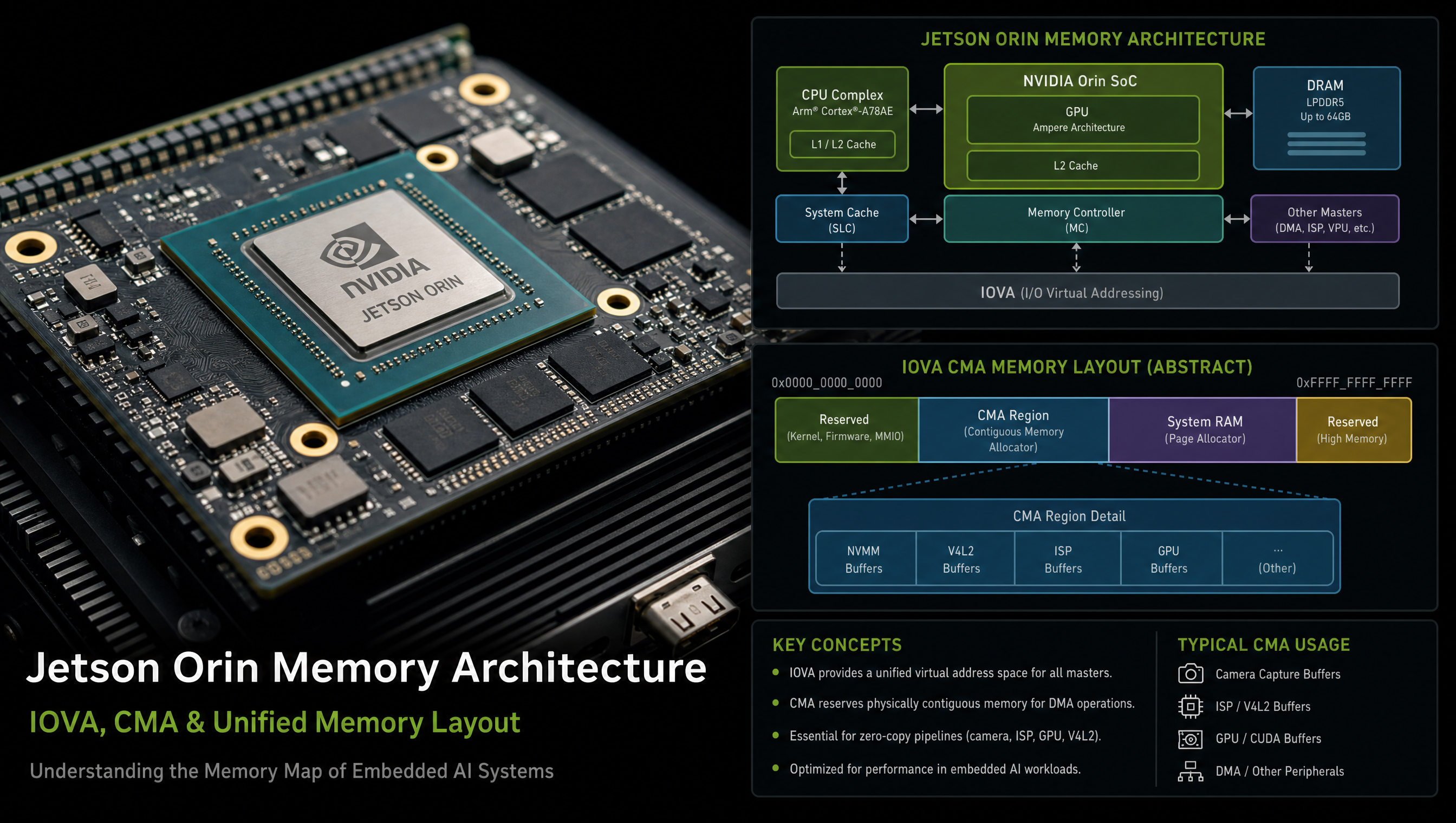
Jetson Orin memory accounting is confusing because it uses a unified memory architecture where GPU, video codec, and AI accelerators share the same physical LPDDR5. What looks like “high RAM usage” at idle is mostly hardware carveouts and IOVA reservation, not Linux process memory. Understanding the breakdown lets you recover memory where your use case doesn’t need certain hardware blocks.
Key Insights
- Unified memory means hardware blocks pre-reserve their working space: GPU, NVDEC, VIC, ISP, and NvMedia each carve out physically contiguous regions before Linux userspace starts
tegrastatsshows actual breakdown: look at RAM / SWAP / IOVA / GR3D fields separately- CMA is the most recoverable reservation: default CMA is 512MB on Orin; if you don’t use hardware video decode/encode, reduce it in the kernel cmdline
jtopgives a more readable view: the open-sourcejtoptool wrapstegrastatsin a human-friendly ncurses UI- GPU carveout scales with CUDA context count: each new CUDA context reserves GPU channel memory; limiting concurrent CUDA users reduces this
Reading tegrastats output
tegrastats --interval 1000
Example output:
RAM 2847/7772MB (lfb 512x4MB) SWAP 0/3886MB
CPU [12%@1574,5%@1574,8%@1574,4%@1574,3%@1574,3%@1574,2%@1574,2%@1574,0%@729,0%@729,0%@729,0%@729]
GR3D_FREQ 0%@0 NVDEC_FREQ 0%@0 NVENC_FREQ 0%@0 VIC_FREQ 0%@0
EMC_FREQ 0%@204 APE 25 MTS fg 0% bg 0%
IOVA 104 MB NVMAP 1124 MB AO 0 MB
| Field | What it means |
|---|---|
RAM 2847/7772MB | 2847MB used of 7772MB visible (AGX Orin 64GB minus carveouts) |
lfb 512x4MB | Largest Free Block count × size, key indicator of fragmentation |
IOVA 104 MB | DMA address space currently mapped by SMMU |
NVMAP 1124 MB | Memory mapped via NvMap (NVIDIA DMA-buf handle allocator), includes video, GPU, ISP |
Where idle memory goes
On a full JetPack install at idle (AGX Orin 32GB):
| Consumer | Approximate size | Recoverable? |
|---|---|---|
| Linux kernel + userspace | ~800MB | No |
| NVIDIA display driver (nvdisplay) | ~200MB | Only if no display needed |
| CMA (kernel contiguous allocator) | 512MB | Yes, reduce to 128MB if no HW video decode |
| GPU channel carveout | ~300MB | Partially, reduce with fewer CUDA contexts |
| NVDEC/NVENC power domain init | ~150MB | Yes, disable if not using HW video codec |
| VIC (Video Image Compositor) | ~100MB | Yes, disable if not using Argus/DeepStream |
| NVMAP shared buffer pool | ~300MB | Partially |
For the Orin Nano 4GB, all of these compete in a smaller pool, the defaults leave less than 2GB visible to free -h.
Reducing CMA
CMA reserves physically contiguous memory for video codec buffers. If you don’t use hardware video decode/encode, reduce it:
# In /boot/extlinux/extlinux.conf, add to APPEND:
cma=128M
# Default is 512M; 128M is sufficient for display-only use

# Or disable CMA entirely (no hardware video decode/encode at all):
cma=0
Rebuild the kernel or edit extlinux.conf, no reflash needed.
Disabling unused video engine power domains
If your application does not use NVDEC/NVENC/VIC:
# Check which video engines are powered on
cat /sys/kernel/debug/bpmp/debug/clk/*/state 2>/dev/null | grep -E "nvdec|nvenc|vic"

# Disable NVDEC power domain at runtime
echo 0 > /sys/devices/platform/tegra-dce/power/control
# (device path varies by L4T version, check /sys/bus/platform/devices/)
Via Yocto, remove the NvMedia and multimedia packages if not needed:
# In your image recipe, replace demo-image-full with a custom base:
IMAGE_INSTALL:remove = " \
    tegra-multimedia-api \
    libargus \
    nvargus-daemon \
"
Monitoring memory under load
# Real-time combined view
tegrastats --interval 500

# Check memory fragmentation (lfb = largest free block)
# lfb dropping to single digits = severe fragmentation
cat /proc/buddyinfo

# Per-process memory (includes GPU mappings)
cat /proc/$(pidof your_app)/status | grep -E "VmRSS|VmPeak|VmSwap"

# IOVA usage per device
ls /sys/kernel/debug/iommu/
jtop: the readable alternative
# Install jtop
pip3 install jetson-stats

# Run
sudo jtop

# Programmatic access
from jtop import jtop
with jtop() as jetson:
    print(jetson.memory)
jtop shows GPU memory, CPU memory, swap, and hardware engine utilization in one view with historical graphs.
FAQ
Why does Jetson Orin show 2-4 GB RAM used at idle?
Most idle memory is hardware carveouts for GPU, NVDEC, VIC, CMA, and IOVA reservation, not Linux process memory. On a full JetPack install, the NVIDIA multimedia stack pre-allocates these regions before your application starts.
What does IOVA mean in Jetson tegrastats output?
IOVA is the DMA address space currently mapped by the SMMU for GPU, video codec, and ISP DMA engines. It does not directly equal physical memory consumption.
How do I reduce idle RAM usage on Jetson Orin?
Reduce CMA (cma=128M in extlinux.conf), remove unused NvMedia packages, and disable NVDEC/NVENC power domains. On a minimal production image this can recover 500MB–1GB of usable RAM.
What is the minimum usable RAM on Jetson Orin Nano 4GB?
On a full JetPack install, approximately 2.5–3GB is available to applications. A minimal image without CUDA/multimedia raises this to ~3.2–3.5GB.
Relevant Services
NVIDIA Jetson Expert Support
Stuck on a Jetson bring-up?
We've debugged this failure mode before. BSP, device tree, camera pipelines, OTA, most blockers clear in the first session. No long retainers. No guessing.
Frequently Asked Questions
Why does Jetson Orin show 2-4 GB RAM used at idle?
Most of the idle memory is not available to Linux applications, it is reserved as IOVA (I/O Virtual Address space for GPU/NPU/video DMA), CMA (Contiguous Memory Allocator for video codec buffers), and carveouts for VIC, NVDEC, NVENC, and display. These are hardware requirements, not Linux kernel or application overhead. tegrastats shows the real breakdown.
What does IOVA mean in Jetson tegrastats output?
IOVA is I/O Virtual Address space, memory mapped by the SMMU (System Memory Management Unit) for DMA engines like the GPU, NVDEC video decoder, VIC image compositor, and ISP. It does not mean the CPU cannot use that memory, IOVA space represents the DMA address range, not always physical memory consumption.
How do I reduce idle RAM usage on Jetson Orin?
Reduce CMA size (if not using hardware video decode), disable unused NVDEC/NVENC/VIC power domains, reduce GPU carveout via NVGPU_DISABLE_CONTEXTS_COALESCING, and remove unused multimedia and AI packages from the image. On a minimal production image without video decode, you can recover 500MB-1GB compared to the full JetPack install.
What is the minimum usable RAM on Jetson Orin Nano 4GB?
The Orin Nano 4GB has 4GB unified LPDDR5. At idle on a full JetPack install, Linux sees approximately 2.5-3GB as available, the rest is consumed by hardware carveouts (GPU, VIC, NVDEC), CMA for video buffers, and the NVIDIA display driver. A minimal image without CUDA/multimedia can raise available RAM to ~3.2-3.5GB.

Written by
Andrés CamposCo-Founder & CTO · ProventusNova
8 years deep in embedded systems, from underwater ROVs to edge AI. Andrés leads every technical delivery personally.
Connect on LinkedInRelated Articles
GMSL YUV422 capture and FORCE_FE errors on Jetson Orin, debug guide
Debug GMSL YUV422 capture issues on Jetson Orin, FORCE_FE decoder config, partial frame faults, and MAX9295/MAX9296 YUV format setup.
Jetson camera works with v4l2-ctl but fails to launch argus_camera, debug guide
Why your Jetson camera works with v4l2-ctl but argus_camera fails, tegra-camera DT node issues, sensor mode tables, and the V4L2-to-Argus fault path.
nvcompositor vs parallel GStreamer pipelines on Jetson Orin, when each is slower
When to use nvcompositor vs parallel GStreamer pipelines on Jetson Orin, why compositor is slower, and how to choose the right path for your workload.
Jetson Orin rootfs-ab slot switches to B unexpectedly, nvbootctrl debug
Why Jetson Orin switches to the B rootfs partition on reboot, how nvbootctrl works, and how to prevent unwanted slot switches with retry counters.