Real-Time Perception on the Edge: Detection, Segmentation, and Depth
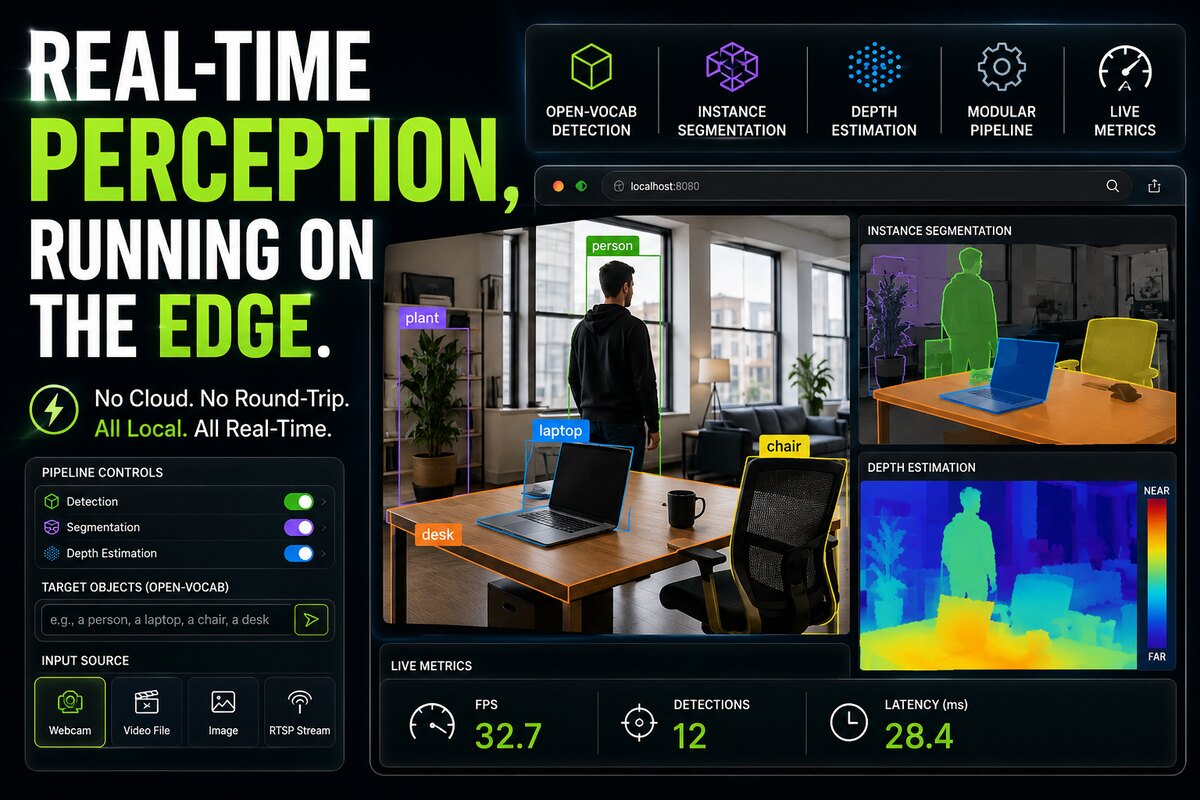
Most computer vision demos you see are running in a data center. This one is not. The video below is a modular perception pipeline running entirely on a local machine, served to a browser over the network, with no cloud round-trip. It runs three perception tasks at once, open-vocabulary object detection, instance segmentation, and monocular depth estimation, and reports live metrics for each. This is the kind of system we build for hardware teams deploying vision on NVIDIA Jetson and MediaTek Genio.
Key Insights
- The pipeline runs open-vocabulary detection: the target classes are typed in as text (
a person,a laptop,a chair,a desk) and applied live, with no retraining. Change the prompt, and the detector localizes the new objects. - Three perception tasks run as toggleable stages: detection, instance segmentation, and depth estimation. Each can be turned on or off so you can see, and measure, the compute cost of each stage independently.
- Everything runs locally. The dashboard is served over the LAN, frames never leave the device, and there is no cloud dependency, no round-trip latency, and no data leaving the premises.
- The interface accepts multiple input sources: live webcam, video file, still image, and RTSP network stream, so the same pipeline can be driven by a real camera or a recorded clip.
- A live metrics panel reports FPS, detection count, and per-stage latency, which is exactly the instrumentation you need to tune a pipeline for a real-time target on constrained hardware.
What the Demo Shows
The interface is organized as a control panel and a set of live views.
Open-vocabulary detection. Instead of a fixed class list baked into the model, the active classes are a text prompt you edit at runtime. In the demo, the prompt is a short list, a person, a laptop, a chair, a desk, and the detector draws labeled boxes for exactly those objects. Swap the prompt for warehouse objects, PPE, or defects on a line, and the same deployed model reports the new set. This is the difference between “the model knows 80 things forever” and “the model detects what you ask it to.”
Instance segmentation. Beyond a bounding box, the segmentation stage returns a per-object mask, so a person, a plant, a laptop, and a chair each get a distinct colored silhouette. Masks are what you need when a box is too coarse, for grasping, measurement, occlusion reasoning, or clean overlays.
Depth estimation. The depth view is a single-camera (monocular) depth map, rendered as a near-to-far colormap. No stereo rig, no depth sensor, just an inference model estimating relative distance from a single RGB frame. For robots and drones, a monocular depth stage is a cheap way to add spatial awareness without new hardware.
Live metrics. FPS, detection count, and detection latency in milliseconds are shown as the pipeline runs. This is the part that matters for edge deployment: perception on the edge is a budget problem, and you cannot tune what you do not measure.
Why Run Perception on the Edge at All
Running these three tasks on-device, rather than shipping frames to a server, is a deliberate architectural choice with concrete benefits:
- Latency. There is no network round-trip. For a robot arm, an autonomous mobile robot, or an inspection station, the control loop cannot wait on a server in another building.
- Privacy and data residency. Camera frames never leave the device. For healthcare, retail, and industrial sites, that removes a whole category of compliance and security concern.
- Reliability. The system keeps working when connectivity drops. An edge perception node does not go blind because the uplink went down.
- Cost. No per-frame inference bill, no bandwidth to stream raw video off-site.
The tradeoff is that you are now solving a hard engineering problem: three models, competing for the same GPU, DLA, memory bandwidth, and thermal budget, all while holding a real-time frame rate.
How This Maps to Production Hardware
The demo runs the pipeline in a browser for clarity, but the same architecture is what ships on an embedded module. In production, the pieces map like this:
- Camera ingest comes from CSI or GMSL2 cameras, or an RTSP feed, decoded through a hardware-accelerated GStreamer pipeline rather than a webcam grab.
- Detection and segmentation run as optimized TensorRT engines on the GPU, with layers mapped to the DLA where they are supported to free the GPU.
- Depth runs as a separate engine, scheduled so it does not starve the detector.
- Zero-copy memory keeps frames in GPU-accessible buffers so they are not copied between stages, which is often the difference between hitting and missing a frame-rate target.
- INT8 quantization is applied where accuracy allows, to cut latency and power.
That is the work: taking a pipeline that runs, and making it run in real time, within a power and thermal envelope, on the specific silicon a product ships on. It is exactly the class of problem ProventusNova solves on NVIDIA Jetson and MediaTek Genio, from camera bring-up through to a deployed, profiled inference pipeline.
Building Something Like This
If you are putting cameras and models on an embedded device and need real-time perception that runs locally, the hard parts are rarely the models themselves. They are the camera bring-up, the GStreamer pipeline, the memory path, the accelerator mapping, and the profiling that gets you from “it runs” to “it runs at frame rate, every time.” That is the work we do on a fixed-bid basis.
Relevant Services
NVIDIA Jetson Expert Support
Stuck on a Jetson bring-up?
We've debugged this failure mode before. BSP, device tree, camera pipelines, OTA, most blockers clear in the first session. No long retainers. No guessing.
Frequently Asked Questions
What is open-vocabulary detection and how is it different from a fixed class list?
A conventional detector is trained on a fixed set of classes (for example the 80 COCO categories) and can only ever report those. An open-vocabulary detector takes the class list as a text prompt at runtime, so you can type 'a person', 'a laptop', 'a forklift', or 'a cardboard box' and the model localizes those objects without retraining. In the demo, the active classes are typed into a text box and applied live. This matters on the edge because you can repurpose one deployed model to a new set of objects without a new training run.
Can detection, segmentation, and depth run at the same time on a single edge device?
Yes, but the three stages compete for the same compute and memory bandwidth, so the pipeline has to be built for it. The demo runs all three as toggleable stages so you can measure the cost of each. On an edge accelerator like NVIDIA Jetson Orin, the practical path is to run detection and segmentation on the GPU or DLA, run monocular depth as a separate optimized engine, and share buffers with zero-copy memory so frames are not repeatedly copied between stages.
Does this perception pipeline require a cloud connection?
No. The entire pipeline runs locally and the dashboard is served over the local network. Frames never leave the device. For robotics, industrial inspection, and any latency- or privacy-sensitive application, on-device inference removes the round-trip to a server, removes the dependency on connectivity, and keeps the data on-premises.
What input sources can an edge perception pipeline accept?
The demo accepts a live webcam, a video file, a still image, and an RTSP network stream. In production the same pipeline typically ingests one or more CSI or GMSL2 cameras directly, or an RTSP feed from an existing camera, and feeds decoded frames into the inference stages through a GStreamer pipeline with hardware-accelerated decode.
What frame rate can real-time edge perception achieve?
It depends entirely on the device, the models, and how many stages are enabled. A single lightweight detector on an accelerated edge module can run comfortably above 30 FPS, while stacking open-vocabulary detection, segmentation, and depth together lowers the throughput. The right approach is to profile each stage, quantize to INT8 where accuracy allows, and map stages across the available accelerators (GPU, DLA) so the target frame rate is met with headroom.
Written by
Andrés CamposCo-Founder & CTO · ProventusNova
8 years deep in embedded systems, from underwater ROVs to edge AI. Andrés leads every technical delivery personally.
Connect on LinkedInRelated Articles
YOLOv8 Object Detection on the MediaTek Genio NPU
Moving YOLOv8 to the MediaTek Genio NPU took our robot's detection from 426 ms to 32 ms per frame and let it run fanless. What it takes, and when it pays off.
AGPL to Permissive License Migration on Jetson TensorRT
How we migrated a Jetson TensorRT stack off AGPL YOLO-World and FastSAM to Apache-2.0 models, and the checkpoint trap that almost broke it.
NPU vs CPU on the MediaTek Genio: the Thermal Reality
On a fanless MediaTek Genio, running a vision model on the CPU pushed our robot to 84 C and throttled. On the NPU it held 58 C. Why edge AI is a heat problem.
Third-party NVIDIA Jetson carrier board manufacturers compared for edge AI
Third-party Jetson carrier board manufacturers compared: Connect Tech, Leopard Imaging, FRAMOS, Auvidea, Tier IV, Seeed Studio. BSP quality and GMSL2 support.